How To Search Data From Database and Filter in Datagridview
Today, in this article, I will show you how to search a record from the database and then filter it into the datagridview.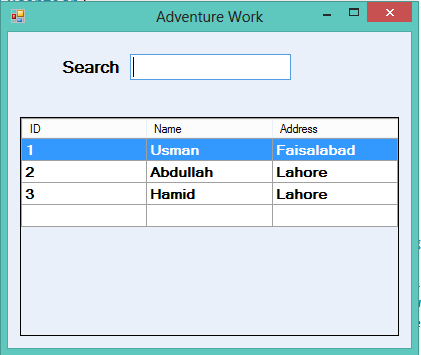

Program:
using System;
using System.Collections.Generic;
using System.ComponentModel;
using System.Data;
using System.Drawing;
using System.Linq;
using System.Text;
using System.Windows.Forms;
using MySql.Data.MySqlClient;

namespace FreeITCodes
{
    public partial class Form1 : Form
    {
        public Form1()
        {
            InitializeComponent();
        }
        DataTable datatable;


        //form load event here data will show in the data gridview
        public void fillGridView()
        {
            try
            {
                //form load event here data will show in the data gridview
                string connectionString = "SERVER=localhost; DATABASE=employee;  USERNAME=root; PASSWORD=ranausman786";
                MySqlConnection objConnection = new MySqlConnection(connectionString);
                objConnection.Open();
                string Query = "SELECT * FROM employee.emp;";
                MySqlCommand objCommand = new MySqlCommand(Query, objConnection);
                MySqlDataAdapter objAdapter = new MySqlDataAdapter();
                datatable = new DataTable();
                objAdapter.SelectCommand = objCommand;
                objAdapter.Fill(datatable);
                dataGridView1.DataSource = datatable;

            }
            catch (Exception)
            {

                throw;
            }
        }

        private void Form1_Load(object sender, EventArgs e)
        {
            fillGridView();
        }

        private void txtSearch_TextChanged(object sender, EventArgs e)
        {
            //textchanged event of texbox when user enter a word in the textbox
            //then through this dataview object string format it will filter
            //and attached the filter result in to the datagridview
            DataView DV = new DataView(datatable);
            DV.RowFilter = string.Format("Name LIKE '%{0}%'", txtSearch.Text);
            dataGridView1.DataSource = DV;
        }
    }
}
How To Use- Watch Video
Posted on 18:02 / 0
comments / Read More


